
Your Cloud Security Tools Are Running. But Are You Secure?
10 November 2026


The dashboard is green. The scanners are scanning. The alerts are flowing into the SIEM, the firewall rules are in place, and the quarterly report says everything is “covered”. So you’re secure. Right? Not necessarily.
Cloud security is no longer just about protecting servers behind a firewall. Modern environments run across virtual machines, containers, APIs, databases, multiple cloud platforms and automated deployment pipelines that push changes faster than most teams can review them. Every one of these pieces come with its own security needs. And here’s the uncomfortable part- a weakness in just one area can quietly open the door to everything else.
For enterprises running critical digital services, keeping attackers out is only half the job. The real challenge is visibility: knowing where sensitive workloads actually live, who or what have access to them, how infrastructure changes get introduced, and whether anyone would notice suspicious activity before it disrupts the business. That’s why security can’t be a checkpoint at the end. It has to run through the whole application lifecycle. Development, deployment, production monitoring, incident response. All of it.
This matters even more for organisations running private clouds, hybrid environments and containerised applications. Infrastructure teams are juggling access permissions, network boundaries, software vulnerabilities, configuration changes, data protection and workload availability, and they’re expected to do it without slowing anyone down. No pressure.
So is the answer more security tools? Not really. Most teams already have plenty. Palo Alto Networks’ State of Cloud Security Report 2025 found organisations run an average of 17 cloud security tools from five vendors. What’s usually missing isn’t another tool. It’s connection: security controls that work together across infrastructure, applications, identities and operations.
Why Cloud Security Is Becoming More Complex
Cloud infrastructure gives organisations the flexibility to provision resources, deploy applications, and scale services when needed. However, that flexibility also changes how security must be managed. In a traditional environment, infrastructure may have been relatively stable, with applications running on a limited number of servers behind established network boundaries.
Modern environments don’t sit still. Applications talk through APIs. Containers get created and replaced automatically. Workloads move between nodes. Pipelines ship changes all day long. And this isn’t a niche anymore: the CNCF 2025 Annual Cloud Native Survey found 98% of organisations have adopted cloud native techniques. Security teams can no longer rely on knowing where every application runs at a particular moment. They need continuous visibility into the infrastructure and the relationships between its components.
Three challenges make this particularly important.
Distributed infrastructure creates more entry points
Enterprise applications rarely work alone; a single business service can lean on several APIs, databases, authentication services, virtual machines and containerised workloads at once, and if one of those pieces is misconfigured or compromised, attackers will use its connections to reach everything else. Take a common case. An application server gets compromised, which on its own isn’t catastrophic, except that server holds excessive database permissions, so customer information is suddenly exposed even though the database never had direct public access. Your database scanner says the database is fine. It is, technically. The problem lives in the connection, and that’s exactly where most tools don’t look.
Automation introduces new security risks
Automation helps infrastructure teams deploy consistently and cut manual work, but it’s also brilliant at spreading mistakes. A misconfigured infrastructure template, an exposed deployment credential or an overly permissive service account doesn’t introduce risk just once; it introduces it again every time a new resource gets provisioned. That’s why security checks need to live inside the automation itself, not run as an afterthought once everything is already deployed.
Visibility gets harder as environments grow
Many enterprises run a mix of private cloud, on-premises infrastructure, public cloud services and container platforms, and each one produces its own logs, alerts and security events. When those signals stay disconnected, a small warning in one place looks harmless, until it turns out to be part of something bigger. This is where “the tools are running” and “we’re secure” start to drift apart. A useful cloud security strategy connects infrastructure monitoring, identity activity, application events and security alerts, so teams can investigate with the full context instead of in fragments.
What Does Cloud Security Actually Protect?
Cloud security is a collection of technical controls, operational processes and governance practices designed to protect cloud-hosted resources and the data they process. It spans several layers. Most organisations have a tool for each one. The question is whether those layers talk to each other.
Infrastructure and virtualisation security
Start at the bottom: physical servers, hypervisors, virtual machines, storage systems, virtual networks. The stuff nobody thinks about until it breaks. Securing this layer means host hardening, tight administrative access, regular patching, network segmentation and proper workload isolation. Private clouds built on platforms like OpenStack add more to the list, because management services need protecting, infrastructure APIs need locking down, and tenants should never be able to reach resources that belongs to someone else. Ever.
Identity and access management
Think about how many identities your cloud actually has. Not just people, but service accounts, automation scripts, application identities and API keys, and every single one is a door. A while back, a team we spoke with found a service account still active two years after its project had shut down. Full admin rights. No owner. Nobody had touched it, so nobody had thought about it. That’s the problem with identity: the infrastructure underneath can be configured perfectly, and weak credentials or forgotten permissions will still expose it. It’s not rare either, since 53% of organisations in the same Palo Alto Networks report named lenient IAM practices as a top challenge. Good IAM answers three simple questions: who can access a resource, what can they do with it, and under what conditions.
Application and API security
Applications bring their own baggage: vulnerable code, insecure authentication, sloppy input validation, and a long chain of third-party dependencies most teams have never fully reviewed. Then there’s APIs. They connect applications to internal services, partners and customer-facing interfaces, which makes them incredibly useful and incredibly attractive, and attackers have noticed. So validate identity and authorisation on every request, restrict what isn’t needed, and watch for unusual traffic patterns.
Data and storage security
This is what attackers are usually after: financial records, customer information, business documents, backups and operational data, often all sitting in the same environment. Protecting it comes down to the right encryption, sensible access restrictions, clear retention policies and recovery procedures that actually work. Distributed storage platforms such as Ceph can handle a wide range of enterprise storage needs, but the platform alone doesn’t make data safe. Access configuration, network controls, encryption choices and day-to-day management decides that.
Workload and runtime security
Here’s a mistake teams make all the time. An application passes its security tests, goes live, and everyone moves on. But production is a different world, where applications can still get exploited, hit with stolen credentials, start running processes nobody expected, or slowly drift through configuration changes. Passing a test once doesn’t make anything safe forever. Runtime security keeps watching: it observes live workloads, flags suspicious behaviour and gives teams what they need to investigate and contain an incident before it spreads.
The Shared Responsibility Model: Who Is Actually Responsible?
One of the most common misunderstandings in cloud security is also one of the most expensive: assuming the platform provider protects everything. It doesn’t. Responsibility depends on the service model and the contract. A public cloud provider typically secures its physical facilities and underlying infrastructure, but customers are still on the hook for their data, identities, application code and a long list of configuration choices. In a private cloud, the line moves further. The organisation, or its infrastructure partner, may also own the physical infrastructure, hypervisors, management services, storage and network architecture.
So write the split down. Don’t assume it.
Picture a financial services company running its applications on a private cloud. The infrastructure operator handles platform patching, host security and storage availability. The application team owns application vulnerabilities and API permissions. The security team looks after access policies, monitoring, incident escalation and compliance reporting. On paper, it’s tidy. Each team has their tools, and each team’s tools are running. Then a privileged account gets misused, and the first question in the incident call is “whose job was it to review that?” Silence. Without clearly defined ownership, critical tasks quietly fall between teams, and nobody notices until an audit, or an incident, forces the question.
A practical responsibility model should answer, without hesitation:
- Who manages infrastructure and platform updates?
- Who approves and reviews privileged access?
- Who secures application code, APIs and deployment pipelines?
- Who monitors security events and investigates incidents?
- Who validates backups, restoration and disaster recovery?
- Who maintains evidence for audits and compliance?
If any answer is “not sure”, you’ve just found your first gap. The goal is simple, even if getting there isn’t: make security responsibilities explicit across the entire operating environment, so nothing important depends on someone assuming someone else has it covered.
The Cloud Security Risks That Hide Between Your Tools
Cloud security incidents rarely come down to one weakness. It’s usually a chain. A vulnerable application here, an excessive permission there, a workload nobody was watching very closely. On their own, each one might sit quietly in a different tool’s “medium” queue. Together? They form a direct path to sensitive data, and that’s critical.
The way attackers get in is changing too. Google Cloud’s Cloud Threat Horizons Report found that in the second half of 2025, exploited third-party software accounted for 44.5% of initial access into cloud environments, overtaking weak credentials (27.2%) for the first time. Even worse, the window between a vulnerability being disclosed and being exploited shrank from weeks to days.
Days. Not quarters. So knowing where the common risks sit, and why they slip past, is the first step to prioritising controls that actually matter.
| Security risk | How it develops | Why tools miss it | Recommended control |
|---|---|---|---|
| Cloud misconfiguration | Publicly exposed resources, insecure network rules, unsafe defaults | Settings drift after deployment, long after the last scan | Configuration baselines and continuous posture checks |
| Identity compromise | Stolen credentials or excessive permissions | A valid login looks normal, even when the wrong person uses it | MFA, least privilege, privileged-access reviews |
| API vulnerabilities | Weak authorisation, poor input validation, missing rate limits | Internal and undocumented APIs often aren't in anyone's inventory | API authentication, authorisation and security testing |
| Vulnerable dependencies | Unpatched libraries or compromised third-party packages | Nested dependencies hide several layers deep | Dependency scanning and patch management |
| Exposed secrets | Credentials stored in source code or deployment pipelines | Secrets sit in repos and pipeline logs that runtime tools never see | Centralised secrets management and credential rotation |
| Container vulnerabilities | Insecure images, outdated packages, excessive cluster permissions | Short-lived containers can vanish before a scan finishes | Image scanning, Kubernetes security controls, runtime monitoring |
| Insecure infrastructure automation | Templates that repeatedly deploy unsafe configurations | The flaw lives in the template, so every new resource looks "as designed" | Infrastructure-as-Code scanning and policy enforcement |
| Limited operational visibility | Disconnected logs, alerts and asset inventories | Each tool sees its own slice, and nobody sees the whole chain | Centralised logging, monitoring and event correlation |
| Inadequate recovery | Backups that are incomplete, inaccessible or untested | Backup jobs report "success" whether or not the restore works | Protected backups and regular restoration exercises |
And this isn’t theoretical. Wiz Research found that 54% of cloud environments have exposed VMs and serverless instances containing sensitive information such as PII or payment data. Still, not every finding deserve the same urgency. A vulnerability in an internet-facing payment service might need fixing today. The exact same issue in an isolated test environment is a very different level of risk. That’s the key distinction. Counting security findings tells you how busy your tools are. Understanding which findings can actually reach critical systems tells you how secure you are.
Bridging the Gap Between Potential and Reality
If your security controls only cover production, they’re starting too late. Think about how risk actually gets in. A developer pulls in a vulnerable dependency. An automation script hands out more permissions than it should. A container image ships with outdated software nobody noticed. None of it looks dramatic at the time, but by the time it reaches production, infrastructure monitoring alone may not be enough to stop someone exploiting it. The better approach connects security checks across the whole delivery lifecycle, so each stage catches a different kind of risk before it moves on to the next:
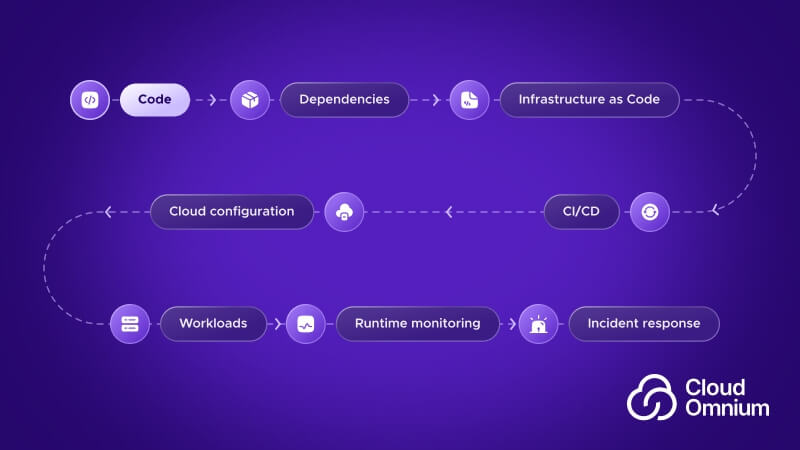
Secure development
Security starts where the code does. Source-code analysis finds programming flaws before release, dependency scanning flags known vulnerabilities in third-party packages, and secrets scanning catches credentials that got committed to a repository by accident (it happens more than anyone admits). The trick is making these checks feel like a natural part of code reviews and developer workflows. Because if they feel like an extra hurdle, people will find a way around them. They always do.
Secure deployment
Infrastructure-as-Code tools let teams define exactly how cloud resources get provisioned, which is great, until a bad definition gets reused fifty times. Scanning those definitions before deployment catches unsafe network rules, excessive permissions and insecure storage settings while they’re still just lines in a file, not live infrastructure. Container images and deployment artefacts deserve the same treatment, checked for known vulnerabilities and for anything that simply doesn’t need to be there.
Secure operations
Once applications go live, the job changes. Security teams need eyes on infrastructure changes, authentication activity, workload behaviour and suspicious network connections, and when an alert fires, investigators should be able to trace it straight to the affected application, identity, infrastructure component and any data that might be exposed. That’s what makes security actionable. Instead of treating every alert as an isolated event from an isolated tool, teams see the relationships that decides its real impact.
Cloud Security Challenges in Private and Hybrid Environments
Private and hybrid environments give organisations something public cloud doesn’t always offer: more control over where infrastructure runs and how it’s configured. But control cuts both ways. The more of the stack you own, the more of it you’re responsible for securing.
Securing private cloud infrastructure
A private cloud built on OpenStack needs protection across its management plane, compute resources, networking, storage and administrative interfaces. That means restricting admin access, properly isolating management interfaces and following documented hardening and patching procedures for every platform component. And test tenant isolation. Don’t just assume it works, because assumptions are exactly where gaps live, so review network security groups, access policies and administrative roles on a regular schedule.(We go deeper on this in our playbook on open-source cloud migration.)
Protecting distributed storage
Distributed storage helps with capacity management and resilient designs, but it still needs strong authentication, network isolation, protected admin interfaces and reliable backups. Here’s the one teams get wrong most often: replication isn’t backup. Replication keeps data available when a storage component fails, but it will also faithfully copy an accidental deletion, or a malicious change, to every replica. Your storage dashboard shows healthy replicas. Your data is still gone. Critical data needs a recovery strategy that covers both infrastructure failure and security incidents.
Maintaining Kubernetes security
Kubernetes comes with its own long checklist: API-server access, role-based access control, secrets management, container image integrity, network policies and workload permissions, plus node configuration, software updates, audit logging and workload behaviour on top. The catch is that a cluster passing its first configuration review can still develop weaknesses as applications, permissions and workloads change around it. So validate controls against how you actually deploy, and keep validating. Running isn’t the same as production-ready, and it definitely isn’t the same as secure.
Managing hybrid infrastructure consistently
Hybrid environments make policy enforcement tricky, since every platform tends to come with its own management console and its own monitoring system. The answer isn’t forcing everything onto identical tools. It’s agreeing on common security principles for identity, logging, vulnerability remediation, data protection and incident response, then adapting how they’re implemented on each platform. Done right, equivalent risks get equivalent protection, and teams can finally see the overall security posture in one place.
Enterprise Cloud Security Best Practices
Here’s the good news. You probably don’t need another product. An effective security programme comes down to three things: preventive controls, continuous monitoring and response procedures you’ve actually tested. None of these is about buying more. All of them are about making the tools you already have work together.
1. Maintain an accurate asset inventory
You can’t protect what you don’t know exists. Simple as that. So keep an up-to-date inventory of cloud resources, virtual machines, containers, applications, APIs, service accounts and sensitive data stores, and track ownership, environment, exposure and business criticality for each one. Automated discovery helps a lot here, especially for catching resources created outside approved processes. Remember that Friday-afternoon container? This is how you find it before someone else does.
2. Enforce least-privilege access
Every user and every service should get only the permissions their work requires, and not one more. Use role-based access controls, multi-factor authentication and separate admin identities where it makes sense, then review privileged access regularly and strip out anything no longer needed. Automation credentials are easy to forget, so give them limited permissions and short lifetimes wherever possible
3. Secure infrastructure and deployment pipelines
Security belongs inside the pipeline, not waiting at the end of it. Build scanning into CI/CD workflows and infrastructure provisioning, with automated checks for vulnerable dependencies, exposed secrets, unsafe container images and insecure infrastructure definitions. Then set clear release rules: critical findings stop the build, and any exceptions get documented with a named owner, so “we’ll fix it later” doesn’t quietly become “we never fixed it”.
4. Protect sensitive data
Start by knowing where sensitive information is stored, processed and transmitted, because you can’t encrypt what you haven’t found. From there, apply the right encryption, access controls, secrets management and retention policies, and check who can reach your backups and whether recovery environments are protected as well as production is. For critical systems, test restoration under realistic conditions. A backup you’ve never restored is a hope, not a plan.
5. Monitor infrastructure continuously
Collect logs and telemetry from cloud platforms, applications, identities, storage and workloads, so monitoring can surface abnormal activity, configuration changes, resource failures and potential incidents as they happen. But volume isn’t visibility. Every alert needs a clear severity and a clear owner, otherwise the handful that really matter gets buried under thousands that don’t.
6. Prepare for incident response
No preventive control eliminates every risk, and something will get through eventually. The question is what happens next. Define procedures for investigating compromised credentials, isolating affected workloads, revoking access, preserving evidence and restoring services, then rehearse them with exercises based on realistic failures and attack scenarios. The middle of a live incident is a bad time to read the runbook for the first time.
7. Review and improve security controls
Security isn’t a project with an end date. It’s an ongoing operational responsibility. Track exposed assets, critical vulnerabilities, remediation time, access-policy violations, monitoring coverage and recovery-test results, and use those numbers to spot the weaknesses that keep coming back. Then fix them properly, one cycle at a time.
A Practical Roadmap for Implementing Cloud Security
Nobody fixes everything at once. And honestly, nobody should try. Trying to roll out every control in one go usually ends in half-finished projects and frustrated teams. A phased approach works better: tackle the risks that matter most first, then widen coverage as your teams and processes mature.
Step 1: Assess the current environment
Before you change anything, find out what you’ve actually got. Inventory your infrastructure, applications, identities, storage systems, deployment pipelines and existing security controls, then identify the critical workloads, externally exposed services, sensitive data, known vulnerabilities and monitoring gaps. Most teams find at least one surprise here. That’s the point.
Outcome: a documented baseline of your current security posture and its most important risks.
Step 2: Prioritise critical systems and attack paths
Not every application carries the same weight, so rank them by business impact, data sensitivity, exposure and recovery requirements. Then do the part most teams skip: map how identities, APIs, applications and infrastructure resources connect to each other, and trace the paths a compromised component could take to reach something critical. This is where the risks hiding between your tools finally becomes visible.
Outcome: a risk-based remediation plan that puts effort on the weaknesses that matter most.
Step 3: Establish security architecture and ownership
Now set the rules. Define security baselines for identity, network segmentation, encryption, workload protection, logging and infrastructure configuration, and document who’s responsible for what across development, infrastructure and security teams. Add approval processes for privileged access and significant infrastructure changes, so big decisions never rely on someone assuming someone else signed off.
Outcome: clear policies, ownership and technical requirements.
Step 4: Integrate security into deployment workflows
This is where security moves left. Introduce automated code analysis, dependency scanning, secrets detection, container scanning and infrastructure configuration checks where they make sense. Start small, with your highest-risk applications, and expand once teams have tested the workflow and trust it. Rolling it out everywhere on day one is how good tooling gets ignored.
Outcome: security issues caught earlier, and more consistent deployment controls.
Step 5: Deploy operational monitoring and response controls
Production needs eyes on it. Centralise relevant logs, set up alerting rules and connect security events to infrastructure and application context, so an alert arrives with the information needed to act on it. Then define the escalation paths, containment procedures and recovery requirements that kick in when something goes wrong.
Outcome: better visibility into production systems and a repeatable response process.
Step 6: Test, measure and refine
Then test it all. Run access reviews, vulnerability assessments, configuration checks, incident exercises and recovery tests, and measure progress against agreed security and operational indicators. Not the number of tools deployed. That number tells you how much you’ve bought, not how secure you are.
Outcome: a measurable improvement programme that adapts as infrastructure and business needs change.
How Do You Know Your Cloud Security Is Working?
Back to the headline. Your tools are running. Fine. But deploying security tools isn’t the same as reducing security risk, and “we have a tool for that” isn’t evidence of anything. What enterprises need is proof: measurable signals that the controls are doing their job. Those signals usually look something like this:
- Asset visibility: how much of your in-scope cloud estate has a known owner and monitoring coverage.
- Critical vulnerability remediation: how fast high-risk vulnerabilities actually get fixed, not just found.
- Access governance: how many privileged-access reviews are overdue, and how many excessive permissions are still open.
- Configuration compliance: the share of resources that meet your approved security baselines.
- Incident response: how long it takes to detect, investigate and contain an incident.
- Recovery readiness: how often backup restorations and disaster recovery exercises succeed.
- Deployment security: how often critical issues are caught before they reach production.
A metric without an owner is just a number on a slide, though. Each one needs someone accountable for it, a set measurement period and a target that fits your organisation. And the targets won’t look the same everywhere. A financial services provider will probably focus on access governance, sensitive-data protection and recovery testing for critical applications, while a software company might lean harder on dependency vulnerabilities, deployment security and remediation speed. Neither is wrong. They just carry different risks.
Now look at what’s missing from that list: “number of security tools deployed”. It’s not there on purpose. A good measurement framework reflects the risks that matters most to the business, not the size of the stack.
The Future of Cloud Security: From Isolated Tools to Connected Operations
So where is all this heading? Away from isolated tools, mostly. Cloud security is shifting toward approaches that connect what’s happening across infrastructure, applications, identities and runtime environments, and a handful of developments are pushing it there.
Security automation is taking on the repetitive work. It spots misconfigurations, enforces policies and routes findings to the right owners, so teams aren’t relying entirely on someone remembering to run a manual review.
DevSecOps moves security into development and delivery itself. Issues show up earlier, when they’re cheaper to fix, and release schedules stay predictable instead of stalling at a last-minute security gate.
Unified security visibility is probably the biggest shift. Pulling data together from different cloud platforms and workloads means a single finding can be seen in its full context, not as one more alert in one more dashboard. It’s also why 97% of organisations in the Palo Alto Networks survey said they’re prioritising consolidation of their cloud security footprint. Fewer silos. More signal.
Identity-first security accepts a reality that’s been true for a while now: permissions and service identities sit at the centre of modern cloud environments. When services talk to each other across distributed infrastructure all day long, guarding the network boundary just isn’t enough on its own.
Runtime detection and response fills the gap that pre-deployment testing leaves behind, catching suspicious behaviour in live systems after the code has already shipped.
But here’s the thing. None of these works well as just another tool bolted onto the stack. They work best as part of one coherent security architecture, and adding tools without deciding how their findings gets prioritised, investigated and resolved tends to add complexity, not reduce risk. Which is the whole point of this article, really.
Running Tools Is Not the Same as Being Secure
Remember that Friday-afternoon container? Every tool was running the whole time, and none of them caught it. That’s the problem in one picture. Cloud security can’t be reduced to a single product or configuration. It’s an ongoing discipline of understanding your infrastructure, controlling access, securing delivery, protecting data and preparing for incidents that will happen anyway. At Cloud Omnium, that’s how we approach it: connecting cloud infrastructure, DevSecOps and operational visibility so engineering and operations teams has what they need to spot problems early and keep services reliable.
So yes, your cloud security tools are running. Good. That was never really the question. The real question is whether your organisation can see how its security posture changes, understand which risks actually matter, and act before they become business disruptions. If you’re reviewing your private cloud, Kubernetes security or infrastructure monitoring strategy, start with what you have today. Identify the critical workloads, map the access pathways, and find where visibility needs to improve. That’s where a more resilient cloud security strategy begins.
Before You Replace VMware, Ask These Five Questions
If your organization is evaluating its next move, start here:
What workloads are we running today?
Do not make assumptions. Map the actual environment.
What do those workloads need tomorrow?
Stability? Scale? Containers? Automation? Greater data control?
Are we replacing a platform or modernizing an operating model?
These are very different projects
Do we have the skills to operate the new environment?
Technology without operational capability quickly becomes technical debt.
How much control do we want over our infrastructure in five years?
This question may matter more than the next licensing quote.
Cloud security starts with understanding the infrastructure, applications and operational processes behind your business. Cloud Omnium helps organisations explore private cloud, DevOps and DevSecOps, infrastructure monitoring and cloud migration solutions designed around enterprise requirements.